
Have you added the Featured section to your profile yet?
I am simply confounded by how many people I help with a one-on-one virtual consultation have not taken advantage of this powerful section. And even those who have added it, many of them haven’t included their most current and important information.
I often refer to this feature as the carousel of your best stuff. It’s a can’t miss visually and the easiest, most functional way to drive people from your profile to your website. In addition, you can upload your most important documents or media files. It works kind of like the old-school slide projector, but instead of clicking to bring up the next slide (document), you slide left to unveil more and more goodies about you and your company.
How do I get the Featured section and how does it work?
Loading it on your profile is super simple. On your profile, click the blue Add profile section bubble, then the down arrow next to Recommended, then Add featured, and then click the plus sign.
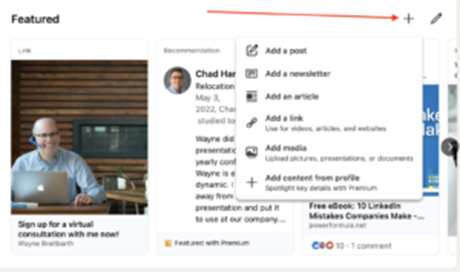
You can then select any of the six types of items and put them in your Featured section (LinkedIn post, LinkedIn article, LinkedIn newsletter, link to a webpage, download a media file or if you have a premium account, LinkedIn profile content). LinkedIn will then take you through the specific steps for adding the item you choose.
The items are loaded with a title and description that you choose, along with a thumbnail visual of the item to grab the reader’s attention. LinkedIn does not allow you to adjust or change the visual. Therefore, if you don’t like the way it appears, you may want to feature a different item.
By default, they display in the order you loaded them, but you can rearrange them so the best two are always up front. Simply click and drag the item using the hamburger icon (four horizontal lines) that appears after you click the pencil in your Featured section. Play around with this. I think you’re going to find it works as intuitively as anything LinkedIn has ever come out with.
What should I feature in my Featured section?
You should feature the kind of content you wouldn’t want your target audience to miss and things you can’t explain or adequately emphasize with words alone. Here are some examples of what you may want to feature.
Business Growth
- PDF file or presentation of your products and services
- Videos of people using your product or service
- Written or video testimonials
- Case studies
- Job openings
Looking for Work
- Resume (written or video)
- Presentation of important accomplishments or recommendations
- Examples of your best work
Improving Personal Brand
- Articles you wrote or were mentioned in
- Links to important projects or samples of your work
- Information about your favorite nonprofit
- Alumni news
Increasing Nonprofit Impact
- Annual or impact reports
- Articles highlighting awards and honors
- Signup sheet or link to volunteer page
- Videos previewing upcoming events or a wrap-up of completed events
- Press releases